Linux

Linux commands

In bash print “hello world”

$ echo "Hello World"

Create directory

$ mkdir testing

Change directory

$ cd testing

List contents inside a directory

$ ls -l

Find logged in user

$ whoami
$ users
$ who
$ w

Find out used disk space in the system by user

$ df -h

Brings the system down immediately

$ halt

Powers off the system using predefined scripts to synchronize and clean up the system prior to shutting down

$ init 0

Reboots the system by shutting it down completely and then restarting it

$ init 6

Shuts down the system by powering off

$ poweroff

Reboots the system

$ reboot

Shuts down the system

$ shutdown

Listing the files

$ ls

Listed files with more information

$ ls -l

List hidden or invisible files

$ ls -a

Create file in Linux

$ vi filename

Display content of a file

$ cat filename

Display file content with line number

$ cat -b filename

Counting words in a file

$ wc filename

Get information about multiple files

$ wc filename1 filename2 filename3

Copying contents from 1 file to another file

$ cp source_file destination_file

Make a copy of existing file

$ cp filename copyfile

Change the name of existing file name

$ mv old_file new_file

Rename the existing file

$ mv filename newfile

Delete a file

$ rm filename

Remove multiple files at a time

$ rm filename1 filename2 filename3

Create symbolic link to a file name

$ ln -s filename symlink

Create hard link to a file name

$ ln filename hardlink

Go to home directory

$ cd ~

Got to user’s home directory

$ cd ~username

Got to last directory

$ cd -

Get current full path

$ pwd

List the files in a directory

$ ls dirname
$ ls /usr/local

Create multiple directory

$ mkdir docs pub

Remove directory

$rmdir dirname

Remove multiple directory

$rmdir dirname1 dirname2 dirname3

Change directory

$ cd dirname

Rename directory

$ mv olddir newdir

Add execute permission of the owner

$ chmod u+x file

Remove write permission from the group

$ chmod g-w file

Set others to read-only (wipes other permissions)

$ chmod o=r file

Give everyone read and write access

$ chmod a+rw file

Add execute permissions for both owner and group

$ chmod ug+x file

Give all permissions

$ chmod 777

Owner can edit, others can run

$ chmod 755

Owner can edit, others can only read

$ chmod 644

Only owner can read/write

$ chmod 600

Read only for owner

$ chmod 400

Change ownership of a file

$ chown user filelist

Changing owner of the file

$ chown amrood testfile

Changing group of the file

$ chgrp developers testfile

Assing a String in a variable and print

$ MESSAGE="I LOVE JESUS"
$ echo $MESSAGE

Deployment – CI/CD

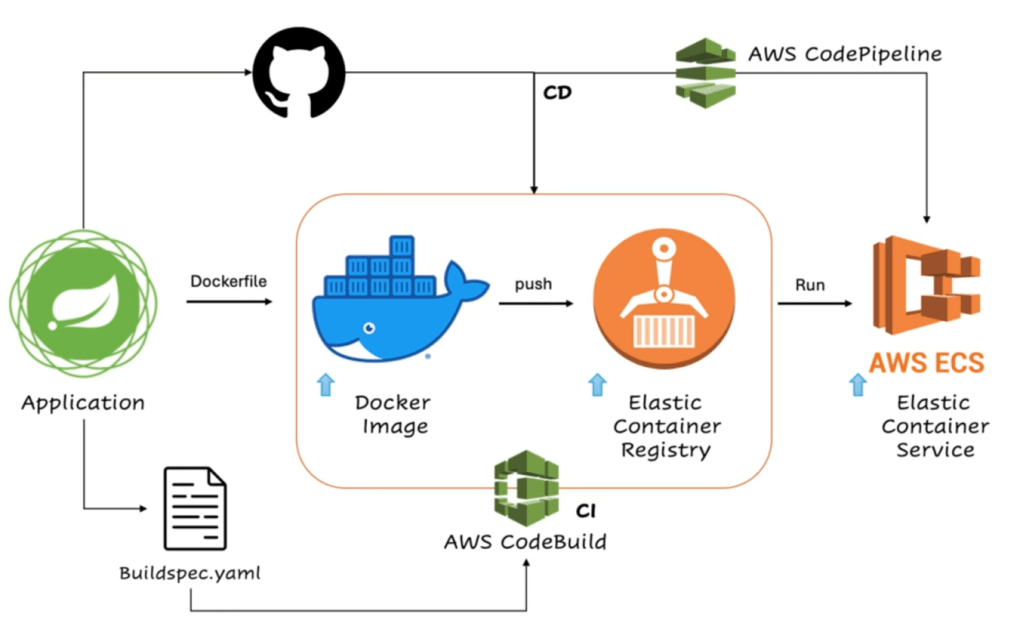
How to deploy springboot to ECS using CodeBuild and CodePipeline ?

Step 1:

Create a Docker file inside JAVA Springboot project and add this content

#Use the official OpenJDK 17 image from Docker Hub
FROM openjdk:17
#Set working directory inside the container
WORKDIR /app
#Copy the compiled Java application JAR file into the container
COPY ./target/course-service.jar /app
#Expose the port the Spring Boot application will run on
EXPOSE 8080
#Command to run the application
CMD ["java", "-jar", "course-service.jar"]

Step 2:

Create Elastic Content Registry at AWS Console.

  • Got o ECR Registry at AWS Console
  • Create repository
  • Write a name for the repository. For an example, “java-registry”

Now we can see the created registry called “java-registry”

Step 3:

Need to create a buildspec.yaml file inside the project. This buildspec.yaml file will create the docker image and then push the image to the hub. Now need to define command for the buildspec.yaml file.

version: 0.2
phases:
pre_build:
commands:
- mvn clean install
- echo Logging in to Amazon ECR…
- aws --version
- REPOSITORY_URI=339713037827.dkr.ecr.ap-south-1.amazonaws.com/javatechie-registry
- aws ecr get-login-password --region ap-south-1 | docker login --username AWS --password-stdin $REPOSITORY_URI
- COMMIT_HASH=$(echo $CODEBUILD_RESOLVED_SOURCE_VERSION | cut -c 1-7)
- IMAGE_TAG=build-$(echo $CODEBUILD_BUILD_ID | awk -F":" '{print $2}')
build:
commands:
- echo Build started on date
- echo Building the Docker image…
- docker build -t $REPOSITORY_URI:latest .
- docker tag $REPOSITORY_URI:latest $REPOSITORY_URI:$IMAGE_TAG
post_build:
commands:
- echo Build completed on date
- echo Pushing the Docker images…
- docker push $REPOSITORY_URI:latest
- docker push $REPOSITORY_URI:$IMAGE_TAG
- echo Writing image definitions file…
- printf '[{"name":"course-service","imageUri":"%s"}]' $REPOSITORY_URI:$IMAGE_TAG > imagedefinitions.json
- echo Writing image definitions file…
# add your container name
- DOCKER_CONTAINER_NAME=java-registry
- printf '[{"name":"%s","imageUri":"%s"}]' $DOCKER_CONTAINER_NAME $REPOSITORY_URI:$IMAGE_TAG > imagedefinitions.json
- echo $DOCKER_CONTAINER_NAME
- echo printing imagedefinitions.json
- cat imagedefinitions.json
artifacts:
files:
- imagedefinitions.json
- target/course-service.jar

Step 4:

Now task for the AWS code build. Go to the code build at aws console.

  • Create project
  • Project name can be “course-project”
  • Select a source provider from Source 1 primary. For an example, select GitHub from dropdown because our project is in at GitHub repository.
  • Select the project from GitHub repository search box.
  • Now create a role at the “Role name” input box. For examle: “course-app-service-role”

Step 5:

Now at the “Build spec” section, select “Use a build spec file” option because we are using created build spec file, we are not doing it manually.

Step 6:

Now press the button “Create build project”.

Now we go to this link:

Developer tools –> Code build –> build projects –> course project

Now we can see our primary repository and service role.

Step 7:

Now need to add rules for role. Go to the permission are by navigating service role directly.

  • Click “add permission”
  • select “attach policy”
  • search “container” and then select “AmazonEC2ContainerRegistryFullAccess” and “AmazonEC2ContainerRegistryPowerUser” from the list.
  • Now press “Add Permission button”

Step 8:

Now navigate here again:

Developer tools –> Code build –> build projects –> course project

Now press “start build” button.

Step 9:

After finish the successful build, we need to check image is pushed or not. Go to the repository and we can see that image is created successfully. There are 2 image create and 1 is with “latest” tag.

AWS code build is finish and continuous integration part is working.

Step 10:

Now go to “Elastic Container Service” from AWS Console.

  • Create “task definition” after clicking “create task definition” button.
  • name it “course-task”
  • select launch type “AWS Fargate”
  • select CPU and memory from dropdown. Example CPU – “.5vCPU” and memory – “1GB”
  • “Container 1” section, need to add container registry name. add the name “java-registry”, copy the repository URI and past it at “image uri” input box.
  • Add container port “8080” and select app protocol “HTTP”
  • now click on create button

Step 11:

Now create a cluster. Name it “java-techie” cluster. Now select “AWS Fargate(Serverless).” Click create button. Now to the the “Cloud formation” and we can see the status. Cluster creation is complete.

Step 12:

Now click the cluster, it will take you to the cluster page. At application type section, select the created cluster. Write a service name at the input box “course-service-v2”.

Step 13:

Create new security group from “network” section and select “Allow all traffic”. select source “Anywhere”. select “All TCP” and again select “Allow all traffic”. Now click “create” button and after few miniutes we will see “course-service-v2” has been deployed successfully.

Step 14:

Now go to the “task” setion and you will see a public IP address. Through this public IP address, now can test REST API using post man or any other testing tool. So now application is running in AWS ECS successfully.

Step 15:

Now during application development, any time code changes, amazon code build should trigger and push the image to the registry and automatically deployment should happen. For this, we need to go to the “Primary web hook” section and check the option “Rebuild every time a code change is pushed to the repository”. Remove filter group and click the “update project” button.

Step 16:

Now do the code changes and push, we will see immediately build started and it will be build number 2.

Kubernetes

What is Kubernetes?

Kubernetes is a open-sourced platform used to deploy containerized application. If a container crashed, kubernetes can restart or replace it automatically. It is automates deployment, monitoring and scaling.

What are the features of Kubernetes?

These are the features of Kubernetes:

  • Self-healing
  • Resource optimization
  • Scaling and load balancing
  • Rollouts and Rollbacks
  • Automated scheduling
  • Containerized infrastructure

What is Kubernetes pod?

Kubernetes pod is the smallest object. Kubernetes do not run container directly, it run pod.

What is Ingress?

It is used to manage external service within a cluster. Traffic routing rules are defined in Ingress resources.

What is a Cluster?

A Cluster is a collection of nodes which works in a single unit. All of these nodes work together to manage containerized application in a single unit.

How to setup Kubernetes Cluster in Ubuntu?

Step 1:

Setup host name at node

$ sudo hostnamectl set-hostname master-node

Step 2:

update and defined host-to-IP mapping

$ sudo nano /etc/hosts
$ 192.168.43.95 master-node

Step 3:

disable swap and load kernel modules

$ sudo swapoff -a
$ sudo swapoff -$ sudo sed -i '/ swap / s/^\(.*\)$/#\1/g' /etc/fstab
$ sudo modprobe overlay
$ sudo modprobe br_netfilter

create configuration file and IP forwarding

$ echo -e "overlay\nbr_netfilter" | sudo tee /etc/modules-load.d/k8s.conf
$ echo -e "net.bridge.bridge-nf-call-ip6tables = 1\nnet.bridge.bridge-nf-call-iptables = 1\nnet.ipv4.ip_forward = 1" | sudo tee /etc/sysctl.d/kubernetes.conf
$ sudo sysctl --system

Step 4:

install and configure containered

install depndency

$ sudo apt update 
$ sudo apt install -y curl gnupg2 software-properties-common apt-transport-https ca-certificates

Add GPG key and repository

$ sudo mkdir -p /etc/apt/keyrings $ curl -fsSL https://download.docker.com/linux/ubuntu/gpg | sudo tee /etc/apt/keyrings/docker.asc > /dev/null $ echo "deb [signed-by=/etc/apt/keyrings/docker.asc] https://download.docker.com/linux/ubuntu $(lsb_release -cs) stable" | sudo tee /etc/apt/sources.list.d/docker.list > /dev/null
$ sudo apt update && sudo apt install -y containerd.io
$ sudo mkdir -p /etc/containerd $ containerd config default | sudo tee /etc/containerd/config.toml >/dev/null 2>&1 $ sudo sed -i 's/SystemdCgroup = false/SystemdCgroup = true/g' /etc/containerd/config.toml $ sudo systemctl restart containerd
$ sudo curl -fsSLo /etc/apt/keyrings/kubernetes-apt-keyring.asc https://pkgs.k8s.io/core:/stable:/v1.30/deb/Release.key $ echo "deb [signed-by=/etc/apt/keyrings/kubernetes-apt-keyring.asc] https://pkgs.k8s.io/core:/stable:/v1.30/deb/ /" | sudo tee /etc/apt/sources.list.d/kubernetes.list

Step 5:

install Kubernetes components and initialized kubernetes cluster

$ sudo apt update 
$ sudo apt install -y kubelet kubeadm kubectl

How to install minikube at Ubuntu ?

curl -LO https://github.com/kubernetes/minikube/releases/latest/download/minikube-linux-amd64
sudo install minikube-linux-amd64 /usr/local/bin/minikube && rm minikube-linux-amd64

Start your cluster

minikube start

How to install kubectl at Ubuntu ?

Download the latest release

curl -LO "https://dl.k8s.io/release/$(curl -L -s https://dl.k8s.io/release/stable.txt)/bin/linux/amd64/kubectl"

Make kubectl binary executable

chmod +x ./kubectl

Move the binary into your PATH

sudo mv ./kubectl /usr/local/bin/kubectl

install kubectl-convert

sudo install -o root -g root -m 0755 kubectl-convert /usr/local/bin/kubectl-convert

check the version

kubectl version

make the shorthand alias for kubectl = k

alias k=kubectl complete -o default -F __start_kubectl k

How to get basic information and addresses about cluster’s control plane ?

kubectl cluster-info

get more detail information about each component:

kubectl cluster-info dump

get status information about nodes:

k get nodes

get health status of a node

k describe node minikube

How to unscheduled new pod but make existing pod running ?

k cordon minikube

How to reverse previous step?

k uncordon minikube

How to lists all virtual clusters inside my cluster?

k get namespace

How to create namespaces?

k create namespace prod
k create namespace dev
k create namespace test

How to check status of all these namespaces?

kubectl get namespaces

How to delete a namespace?

k delete namespace prod

How to get all information about a “namespace”?

k describe namespace prod

How to find resources from default namespace?

kubectl get pods

How to get resources from “dev” namespace?

k get pods -n dev

How to create node?

kubectl create deployment hello-node --image=k8s.gcr.io/echoserver:1.4
kubectl create deployment hello-node --image=k8s.gcr.io/echoserver:1.4 -n dev

How to get status of all pods in all namespaces?

kubectl get pods --all-namespaces

How to get a list of activity?

kubectl get events -n dev

How to get a list of all events?

kubectl get events --all-namespaces

How to create service and expose a node to the port?

kubectl expose deployment hello-node --type=LoadBalancer --port=8080 -n dev

How to check status of the service?

k get services

How to check kubernetes cluster is working correctly and check to access?

minikube service hello-node -n dev

Minikube commands

Installation: https://minikube.sigs.k8s.io/docs/start/
minikube config set driver docker
minikube start // stop
minikube status
minikube dashboard --url
minikube service <applicaiton-service-name>

Kubectl Insallation/Configuration

Installation: https://kubernetes.io/docs/tasks/tools/install-kubectl-linux/
curl -LO "https://dl.k8s.io/$(curl -L -s https://dl.k8s.io/release/stable.txt)/bin/linux/amd64/kubectl.sha256"
sudo install -o root -g root -m 0755 kubectl /usr/local/bin/kubectl
cat ~/.kube/config // kubectl config view
alias k='kubectl'
cat ~/.kube/config // kubectl config view alias k='kubectl'

Kubectl commands

kubectl get namespace
kubectl get deployment
kubectl get replicasetP
kubectl get configmap
kubectl get nodes
kubectl describe nodes
kubectl get events
minikube service mywebapp

Cluster Management

kubectl cluster-info
kubectl get nodes
kubectl describe node minikube
kubectl cordon minikube
kubectl drain minikube --ignore-daemonsets=true --force
kubectl uncordon minikube

Namespaces

kubectl get namespace
kubectl create namespace dev
kubectl create namespace test
kubectl delete namespace test
k create -f namespaces/namespace-prod.yaml
k describe namespace prod
# OPTIONAL kubectl config set-context --current --namespace=<NAMESPACE NAME>

Your Hello World Kubernetes Project

kubectl get get pods
kubectl get pods -n dev
kubectl create deployment hello-node --image=k8s.gcr.io/echoserver:1.4
kubectl create deployment hello-node --image=k8s.gcr.io/echoserver:1.4 -n dev
kubectl get deployments --all-namespaces
kubectl get events -n dev
kubectl expose deployment hello-node --type=LoadBalancer --port=8080
kubectl get services
minikube service hello-node
//On cloud providers that support load balancers, an external IP address would be provisioned to access the Service. On minikube, the LoadBalancer type makes the Service accessible through the minikube service command.

Deployment

kubectl apply -f solution/v1.yaml

Service LoadBalancers

kubectl apply -f solution/v2.yaml

Config Maps and Scaling

kubectl apply -f solution/v3.yaml

Resource Limits

kubectl apply -f solution/v4.yaml

Troubleshooting, Logs, Rollouts, Draining Nodes

k describe deployment mydeployment

Logs

k logs -f -l app=mywebapp

Rollouts

kubectl rollout k rollout restart deployment mydeployment kubectl drain minikube --ignore-daemonsets=true --force

Docker

What is Docker ?

Docker is a open-source platform that allows user to build, package and run application inside a container.

How to install Docker in Ubuntu ?

Step 1:

Open the CLI terminal in Ubuntu and run this command to update software repositories.

sudo apt update

Step 2:

Install docker by following command:

sudo apt install docker.io -y

Step 3:

Enable and start docker service

sudo systemctl enable docker --now

Step 4:

Check the docker version

docker --version

How to execute Docker command without sudo ?

To achieve this, we need to add Ubuntu user to the docker group.

docker --versiosudo usermod -aG docker $USER

Now find out current add user is added to the docker group or not

getent group docker

Now refresh the group permission

getent group docknewgrp docker

Now restart docker

sudo service docker restart

How to create images from docker file ?

Build docker image from docker file

suddocker build -t <Name of the Dockerfile>
docker build -t myimg:latest .

Docker basic commands:

Old CommandsNew CommandsPurpose
docker psdocker container lsList containers
docker rundocker container runRun a command in a new container
docker rmdocker container rmRemove one or more containers
docker imagesdocker image lsList images
docker rmidocker image rmRemove one or more images

How to list all pulled images?

docker images

How to map port on a host?

docker run -p -d 8080:8080 ubuntu

How to login docker, build and push?

login:

docker login

build:

docker lodocker build -t image_name:tag .

push:

docker push <Image name/Image ID>

How to stop docker single container and multiple containers?

docker stop container_name_or_id
docker stop container1 container2 container3

How to restart and inspect docker ?

restart:

docker sdocker restart container_name_or_id

inspect:

docker inspect container_name_or_id

What is docker hub?

It is a cloud based registry for docker images. It contains vast repository of public images and official images for popular applications and services.

What is docker image?

It is a virtual template which is used to create containers, it is includes everything which are need to run an application such as OS, application code, libraries, dependencies. A docker file has a set of scripts or instructions which specify dependencies, environment variables etc and by a “docker build command”, user can create a docker image.

What is docker compose ?

Docker compose is a multi container managing tool. It is uses YAML file. With docker compose, user can start, stop and all other services with single command.

AWS (Amazon Web Service)

What is AWS ?

It is a amazon cloud computing service. It is a computer resource in cloud and provide services for individuals, start-ups, governments and enterprises for computing, storage data, application deployment and hosting and many other services. It has pay as go model which means a client need to pay only how many resources it is using and depending on processing the data.

How many model it has ?

It has 3 kinds of models.

  • IaaS
  • PaaS
  • SaaS

What is IaaS ? How it works ?

It is a Infrastructure as a Service. It gives capability to customer to use resources in cloud as its product development infrastructure. A customer can use this resources from amazon cloud to host it’s application, deployment, storage data, processing of data and optimize its resources and can create virtual resources for re-sale.

What is PaaS and how it works ?

It is Platform as a Service. It provides databases, data flow engines, email services and etc. An application use this resources to make it dynamic and scale able.

What is SaaS and how it works ?

It is Software as a Service. 3rd party customer’s can provide software solutions for other customers using this model, it is a service oriented model where one customer charge another customer for its services. Mostly for startups, it is the best model. Now today’s world, SaaS solutions model is the best model for software companies, enterprise and other business companies.

What is AWS EC2 ?

It stand for Elastic Computing Cloud, it provides user to create virtual machines regarding their requirements or application requirements. We call it ‘instances’ and it can launch in a minutes. We can scale this instances according to demands and can choose windows or linux operating systems for our instances.

What is AWS S3 ?

It is a storage from amazon cloud. It is called “S3 bucket”. In this bucket, customer or user can store its server less application, images, files etc. Applications developed by user or customer can access those files from S3 bucket and can provide authorized and non authorized access for stored files from S3 bucket.

What is AWS Management Console ?

It is a user interface from Amazon cloud. With this user interface user can manage services provided from amazon cloud, activate and deactivate its services, can see and manage cost of its services and performances.

What is AWS Identity Access Management (IAM) ?

It is a user and role management from amazon cloud system for users. With this service, root user can create many users for their application or software, cloud access and resource access. All users always do not need to have access in all services and files, so root user can create user with different role.

What is AWS Lambda ?

It is a server less computing provided by amazon cloud. With this service, user do not need to run code in a server, code will execute only when it is trigger. Lambda does not run 24/7 and it is cost user 0. It is do not run code until it is trigger.

What are the difference between AWS Lambda and EC2 instance ?

AWS LambdaEC2 Instance
It executes maximum 15 minutes.It can executes unlimited times.
Do not need to manage this service.Need to manage this service because user need to manage operating system for an EC2 instance. So management is high.
User will pay only code runs. Do not need to pay always.User will need to pay for every hour when server is on.
For small application, it can be best choice.For large enterprise application, it is the best solution.

What is AWS VPC ?

It is called AWS Virtual private cloud. It is a private virtual network inside amazon cloud. It gives possibility to user to make public and private accessible for the resources. User can manage their network flow, flow of traffic inside this VPC system. User can create dedicated virtual IP and firewall for their resources. User can manage route and can handle highly secure architecture for their application.

What is Route 53 ?

It is a domain name system provided by AWS. It translates IP address to human readable domain address like “www.mydomain.com” or etc. An IP address can pointing to a domain name using route 53.

About Me

Who I am?

My name is Muhammad Yeasin, and I am a Computer Science and Engineering graduate currently living in Stuttgart, Germany. I have several years of experience working with technologies such as Java, TypeScript, JavaScript, Spring Boot, Angular, and ReactJS. Recently, I took a career break during which I focused on improving my skills in AWS, Docker, and Kubernetes. I have a strong interest in DevOps, DevSecOps, and cloud technologies, especially Amazon Web Services. I enjoy working in Linux environments, and writing commands in the terminal is something I truly like. Solving problems related to Linux and DevOps is one of my key passions. I recently decided to start my own technical blog, where I will regularly write and share my knowledge and experiences. In the future, I also plan to create video tutorials focused on DevOps topics. At the moment, my blog is not very well organized, but I am continuously working to improve and structure it better over time.

I live in Stuttgart with my wife and 2 little sons, spending time with my 2 little son and playing with them is another joyful part in my life.

What I think about Computer Science?

Computer science is often seen as a highly logical and structured discipline, but at its core, it is deeply artistic. Like any form of art, it involves creativity, imagination, and the ability to transform abstract ideas into something meaningful and functional. Writing code is not just about solving problems—it’s about expressing solutions in elegant, efficient, and sometimes even beautiful ways. Just as a painter chooses colors or a musician composes melodies, a developer designs systems, structures logic, and crafts experiences that can impact millions of people.

Which childhood TV series still I watch?

Most heart touching TV series in my life

What are the best things in Germany I like most?

Drinking cold beer in a beer garden in summer and gluhwein in Christmas market in December.

What I do in my free time?

Watch movies and listen musics.